M-Pesa is not just a payment method in Kenya, it is the payment method. With over 30 million active M-Pesa users and more than Ksh 1 trillion transacted monthly, any Kenyan professional website Kenya project that involves selling products, services, or bookings online must accept M-Pesa.
This guide covers how M-Pesa integration works for websites in Kenya, from choosing the right API method to going live with Safaricom's Daraja platform.
How Daraja API Works on Websites
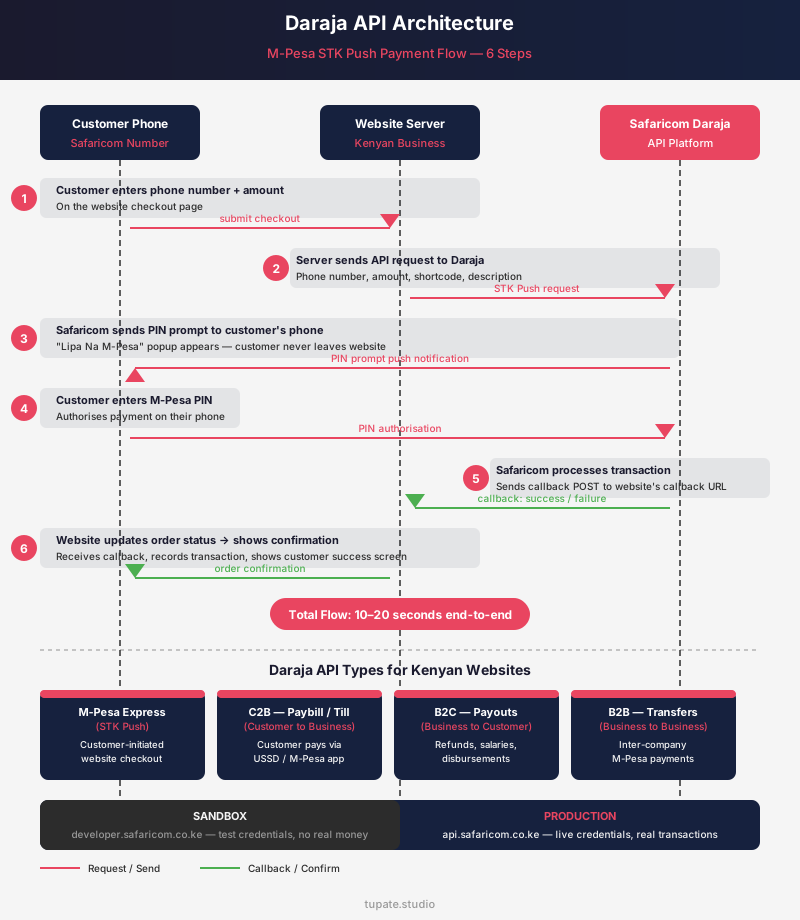
Daraja is Safaricom's developer platform, accessible at developer.safaricom.co.ke, that provides the APIs enabling Kenyan websites and mobile apps to send and receive M-Pesa payments programmatically. Understanding how Daraja works is the foundation for every M-Pesa integration decision a Kenyan business makes.
The STK Push flow
The STK Push (Lipa Na M-Pesa Online) flow is the most important Daraja API for Kenyan e-commerce and service websites. The entire flow takes 10–20 seconds, and the customer never leaves your website.
- The customer enters their Safaricom phone number and the payment amount on your website checkout page.
- Your website server sends an API request to Safaricom's Daraja endpoint with the customer's phone number, the amount, your business shortcode, and a transaction description.
- Safaricom's system sends a PIN prompt directly to the customer's phone. A "Lipa Na M-Pesa" popup appears on their screen asking them to enter their M-Pesa PIN to authorise the payment.
- The customer enters their PIN on their phone.
- Safaricom processes the transaction and sends a callback (a POST request) to your website's callback URL confirming success or failure.
- Your website receives the callback, updates the order or booking status, and shows the customer a confirmation screen.
The four main Daraja API types
Daraja provides four main API types for different payment scenarios:
- M-Pesa Express (STK Push): handles customer-initiated payments from a website, the standard e-commerce payment flow.
- C2B (Customer to Business): handles payments where the customer pays to a Paybill or Till through their own M-Pesa menu (USSD or app), with the business receiving an automated callback notification.
- B2C (Business to Customer): transfers money from the business to a customer's phone, used for refunds, payouts, and salary disbursements.
- B2B: handles business-to-business M-Pesa transfers for inter-company payments.
Sandbox vs production
All Daraja API development begins in Safaricom's sandbox environment. The sandbox provides test credentials, test phone numbers, and a simulated M-Pesa environment where developers can build and test the full integration without real money moving.
Only after the integration is fully tested in sandbox does the business submit a go-live application to move to production credentials. The API calls, endpoints, and logic between sandbox and production are identical, only the credentials and base URLs differ.
Tupate Studio builds every M-Pesa integration in sandbox first, ensuring the full payment flow is tested before any real customer transaction is processed.
Choosing the Right M-Pesa Method
Kenyan businesses often ask which M-Pesa method to use on their website. The answer depends on how payment is initiated and how the business needs to track individual customer transactions.
Choosing the wrong method creates a poor customer experience and reconciliation problems. Choosing correctly makes the payment flow invisible in its simplicity.
STK Push (M-Pesa Express)
The customer enters their phone number on your website and authorises payment from their phone. The PIN prompt comes to them.
Best for:
- e-commerce checkout where the customer is paying for a specific order
- service booking payment on restaurants, hotels, and appointment-based businesses
- subscription billing with a fixed or variable amount per cycle
The user experience is seamless. The customer does not leave the checkout flow.
STK Push requires a Daraja API integration (developer work) and a Safaricom Lipa Na M-Pesa account.
Transaction limits: minimum Ksh 10, maximum Ksh 150,000 per single transaction.
For Kenyan businesses where most transactions fall within this range, which is the majority of consumer e-commerce and service businesses, STK Push is the correct choice.
Paybill
The customer opens their own M-Pesa menu (USSD by dialling *334# or the M-Pesa app), selects "Lipa Na M-Pesa," enters the business Paybill number, then enters an account number (which the business defines, typically an invoice number, order reference, or student admission number), and enters the amount.
Best for:
- invoice payments where the customer references a specific invoice
- school fee payment where the student's admission number is the account reference
- SACCO deposits
- any scenario where the customer is making a payment they initiated away from your website
Paybill requires less developer work than STK Push. You can display the Paybill number and instructions on your website without any API integration.
However, the customer has left the website to make the payment, and reconciliation requires matching the Paybill notification to the correct invoice.
Till Number (Buy Goods and Services)
The customer pays to a merchant's Till number through their M-Pesa menu, no account reference, just the Till number and amount.
Best for:
- physical retail locations
- market stalls
- simple marketplace payments
Till is less suitable for websites that need to match individual customer payments to orders, because the Till payment carries no order reference.
The business receives M-Pesa notifications when payments arrive but has no automated mechanism to link them to a specific website order without a separate reconciliation process.
Recommendation matrix
- E-commerce websites selling products should use STK Push.
- Schools collecting fees with student-specific account references should use Paybill.
- Restaurants and hotels taking bookings and requiring seamless on-website payment should use STK Push.
- Consultants and service businesses issuing invoices should use Paybill with invoice number as the account reference.
- Any Kenyan business with transaction values above Ksh 150,000 (the STK Push single-transaction limit) needs either Paybill or a split-payment approach.
WooCommerce M-Pesa Plugins
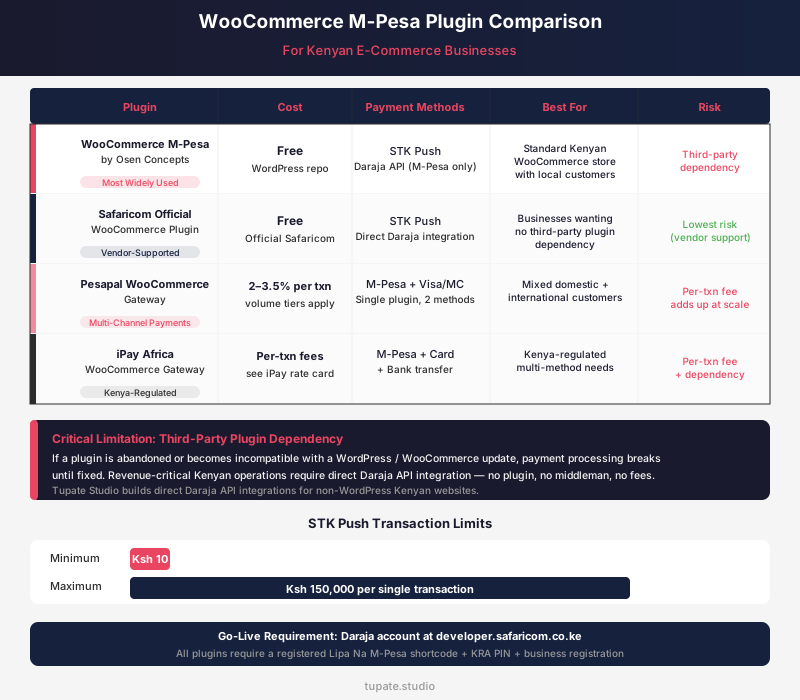
WooCommerce is the most common e-commerce platform used by Kenyan businesses building their first online store. Adding M-Pesa payment to a WooCommerce store is done through a plugin, but not all Kenyan WooCommerce M-Pesa plugins are equal in reliability, ongoing maintenance, and the risk they introduce as a third-party dependency.
WooCommerce M-Pesa by Osen Concepts
The most widely used free M-Pesa WooCommerce plugin in Kenya. Uses STK Push via the Daraja API. Actively maintained with regular updates.
Straightforward setup requires your Daraja API Consumer Key, Consumer Secret, and Lipa Na M-Pesa shortcode. For most Kenyan WooCommerce stores with standard checkout requirements, this is the starting point.
Available on the WordPress plugin repository.
Safaricom Official WooCommerce Plugin
Released and maintained directly by Safaricom. Official support from the M-Pesa developer team. Free.
For Kenyan businesses wanting the assurance of a vendor-supported plugin without third-party dependency, this is the correct choice.
Integration requires a Daraja API account at developer.safaricom.co.ke and a registered Lipa Na M-Pesa account.
Pesapal WooCommerce Gateway
Adds M-Pesa and card payments (Visa, Mastercard) in a single plugin, useful for Kenyan businesses that sell to both local M-Pesa users and international customers who pay by card.
Pesapal charges a per-transaction fee (typically 2–3.5% depending on the payment method and volume tier).
Best for: Kenyan businesses with mixed domestic and international customer bases that need a single payment solution covering both markets.
iPay Africa WooCommerce
A Kenya-based payment gateway offering M-Pesa, card, and bank transfer options in one integration. Similar positioning to Pesapal.
Per-transaction fees apply. Useful for businesses that want the credibility of a Kenya-regulated payment processor alongside multi-method support.
The critical limitation
The critical limitation of all WooCommerce M-Pesa plugins is third-party dependency: if a plugin is abandoned by its developer or becomes incompatible with a WordPress or WooCommerce update, payment processing breaks until the plugin is updated or replaced.
Kenyan businesses that have built revenue-critical operations on an outdated plugin face downtime that costs directly in lost sales.
Tupate Studio builds direct Daraja API integrations for non-WordPress Kenyan websites, eliminating plugin dependency, avoiding per-transaction gateway fees, and giving the business full control over the payment flow and reconciliation data.
Daraja Go-Live Requirements
Moving a Daraja API integration from sandbox testing to production (live payments from real Kenyan customers) requires a formal go-live application process with Safaricom.
Understanding this process prevents the delays that catch Kenyan developers and business owners off guard when they are ready to launch their M-Pesa-integrated website.
Go-live checklist
- A registered M-Pesa business account with Safaricom. This requires a Kenya Revenue Authority (KRA) PIN, a valid Kenyan business registration certificate, and the business owner's national ID.
- A Lipa Na M-Pesa shortcode (a Paybill number or a registered Till number) linked to the business account.
- A completed Daraja Go-Live application form submitted through developer.safaricom.co.ke.
- A fully tested integration on the Safaricom sandbox environment. Safaricom reviewers check that all API endpoints were called correctly during testing and that the callback handling is properly implemented.
- Callback URLs that are publicly accessible via HTTPS, not HTTP, not a localhost URL, and not a URL that returns errors when Safaricom's servers send a POST request.
- A business use-case description explaining what the Daraja API will be used for (e-commerce checkout, school fees, hotel booking payment).
Safaricom's compliance review of the go-live application typically takes 5–10 business days in 2024–2025, though complex integrations or incomplete applications can extend this to 15 business days.
During this period, the integration is live in sandbox only. Real customer payments cannot be processed.
Common rejection reasons
- Callback URL not accessible via HTTPS (a valid SSL certificate on the production domain is mandatory)
- Incomplete API endpoint testing in sandbox (Safaricom can see the testing logs)
- Missing or incorrect linking between the Daraja application and the business M-Pesa account
- Business description too vague to verify the use case
Ongoing production requirements
Kenyan businesses using B2C (sending money to customers for refunds or payouts) must maintain adequate M-Pesa business float in their business account.
Callback endpoint uptime must be maintained. If the callback URL is unreachable when Safaricom sends a payment confirmation, the payment succeeds on the customer's phone but the website does not update the order status.
Tupate Studio implements redundant callback handling and reconciliation queues to prevent this scenario.
Testing on Safaricom Sandbox
Safaricom's sandbox environment at developer.safaricom.co.ke provides all the tools needed to build and verify a complete M-Pesa integration before going live.
Proper sandbox testing is what separates integrations that work reliably in production from those that fail on edge cases during real customer transactions.
Sandbox access setup
Register a developer account at developer.safaricom.co.ke, create a new application, and select the M-Pesa APIs your integration requires (M-Pesa Express for STK Push, C2B for Paybill callbacks).
The sandbox provides a Consumer Key, Consumer Secret, and a set of test shortcodes and phone numbers for simulation.
STK Push testing flow
- Use Postman or cURL to first generate an OAuth2 access token. This is a POST to the OAuth token endpoint using Basic Auth with your Consumer Key and Consumer Secret. The response is a bearer token valid for 60 minutes.
- Call the STK Push endpoint with the bearer token in the Authorization header, the test shortcode, the sandbox test phone number in the format 2547XXXXXXXX (Kenyan phone numbers must include the country code without the leading zero — 0712345678 becomes 254712345678), the amount, and your callback URL.
- Safaricom's sandbox then simulates the customer PIN prompt and sends a test callback to your callback URL.
Three common sandbox issues
- Wrong API endpoint URL: sandbox and production Daraja endpoints have different base URLs (sandbox uses sandbox.safaricom.co.ke, production uses api.safaricom.co.ke)
- Token expiry: OAuth2 tokens expire every 60 minutes, and integrations that cache tokens without checking expiry will fail after the first hour
- Incorrect phone number format: submitting 0712345678 instead of 254712345678 returns a validation error that is not always clearly described in the API response
Tupate Studio's M-Pesa integration code handles all three of these edge cases with automatic token refresh, phone number format normalisation, and clear error logging.
Switching from sandbox to production
Replace the Consumer Key, Consumer Secret, and shortcode in your configuration with the production credentials provided by Safaricom after go-live approval.
The API logic, endpoints (with the base URL change), and callback handling remain identical. No code restructuring is required if the sandbox integration was built correctly.
Transaction Limits and Float Management
M-Pesa's technical capabilities have practical boundaries that affect how Kenyan businesses structure their payment flows and operations.
Understanding these constraints before launching prevents customer-facing errors that damage trust.
STK Push transaction limits
Transaction limits for the Lipa Na M-Pesa (STK Push) service in 2024–2025:
- minimum transaction value Ksh 10
- maximum single transaction value Ksh 150,000
For a Kenyan business selling products above Ksh 150,000 — high-value electronics, property deposit payments, commercial equipment — the STK Push single-transaction limit means the payment cannot be completed in one step.
Options for these scenarios:
- split the payment into two STK Push transactions (within the customer's remaining daily limit)
- use Paybill, which does not have the same per-transaction ceiling
- accept an alternative payment method (bank transfer, card payment via Pesapal or DPO Group) for high-value transactions
Daily cumulative limits
Daily cumulative limits vary by M-Pesa customer tier. Standard M-Pesa customers have a daily transaction limit of Ksh 300,000 across all outgoing M-Pesa transactions.
Enhanced KYC customers who have upgraded their M-Pesa accounts at a Safaricom dealer have higher limits.
For Kenyan businesses where a single customer might be making multiple large purchases or payments within a day, the customer's cumulative daily limit can block a payment even if the individual transaction is below Ksh 150,000.
Float management
Float management applies to Kenyan businesses using B2C, sending money from the business account to customers (refunds, payouts, commission distributions, prize payments).
The business M-Pesa account must hold adequate float for the expected B2C outflow. An insufficient float balance causes B2C transactions to fail silently, the API call is accepted but the disbursement does not go through until the balance is replenished.
Kenyan businesses running B2C at scale should monitor float levels and set automated alerts when the balance approaches a minimum threshold.
Reversals and compliance
M-Pesa transaction reversals: if a customer pays to the wrong Paybill or Till by mistake, a reversal can be initiated through Safaricom Business support within 24 hours. For STK Push transactions, the reversal process goes through Safaricom's business dispute process.
All M-Pesa business account transactions are electronically recorded and form part of the business's KRA-reportable revenue. Every M-Pesa receipt corresponds to a traceable transaction that is auditable by the Kenya Revenue Authority.
Kenyan businesses integrating M-Pesa should ensure their accounting and tax reporting systems capture M-Pesa revenue accurately to avoid KRA compliance issues during audits.
M-Pesa integration is one critical component of a complete Kenyan e-commerce website, but the payment layer alone does not generate revenue. The full architecture that a Kenyan e-commerce business needs includes: a product catalogue with filtering and search, a checkout flow designed for Kenya's mobile-first browsing behaviour, order management and fulfilment tracking, delivery integration for Kenyan logistics providers, and SEO structure that puts the store in front of Kenyan buyers searching for the products you sell. Our e-commerce website development Kenya page covers the complete system for Kenyan online stores.
For businesses requiring direct Daraja API integration without plugin dependency, custom-built for unique payment flows or high transaction volumes, our custom e-commerce development Kenya page covers the full architecture. Tupate Studio builds Kenyan digital presence that works at every layer: from the payment button to the Google ranking.
M-Pesa Beyond E-Commerce
M-Pesa integration is not exclusively for e-commerce businesses. Kenyan service businesses, consultants, law firms, accounting practices, training institutes, and event organizers use M-Pesa as their primary payment collection channel without needing a product catalogue or shopping cart.
Invoices and professional services
For consultants, lawyers, and accounting practices, a Paybill number with invoice number as the account reference allows clients to pay invoices via M-Pesa directly.
The business receives M-Pesa payment notifications referencing the invoice number, enabling reconciliation. Clients can pay from anywhere in Kenya without visiting a bank, which is particularly convenient for Kenyan SME clients managing cash flow across multiple service providers.
Events and training
For training institutes and event businesses, M-Pesa payment confirmation serves as the ticket or registration confirmation.
The participant pays the Paybill or STK Push, receives an automatic M-Pesa SMS confirmation, and sends a screenshot to the organiser via WhatsApp to confirm their slot.
For higher-volume events, a custom registration page with STK Push integration automates the entire confirmation flow: the participant pays, the website confirms payment, and a branded confirmation email or WhatsApp message is sent automatically.
Recurring services
For subscription services, recurring M-Pesa payments are not natively supported by the basic Daraja API.
Recurring billing requires either Pesapal's recurring billing service, a custom implementation using Daraja's Standing Order API (available to approved businesses), or a manual payment reminder workflow where the business sends an M-Pesa payment request to the customer at the billing date.
For Kenyan businesses with subscription models, Tupate Studio assesses the volume and builds the most appropriate solution. See also e-commerce website development Kenya for subscription e-commerce architectures, and custom e-commerce development Kenya for direct Daraja API implementations without third-party dependency.
Combining M-Pesa payment capability with strong local search visibility ensures Kenyan customers can both find and pay you online. A local SEO Kenya strategy working alongside M-Pesa integration gives your Kenyan business both discoverability and frictionless payment, the two most critical elements for online revenue growth.
Frequently Asked Questions
How much does M-Pesa integration cost for a Kenyan website?
Tupate Studio includes M-Pesa Paybill display, manual payment instructions with your Paybill number and account reference format, in all website builds at no extra charge. STK Push Daraja API direct integration is included in custom e-commerce development projects. WordPress and WooCommerce M-Pesa plugin setup and configuration costs Ksh 5,000–8,000 depending on the plugin and testing requirements. WhatsApp us for a specific quote for your integration requirements.
Do I need a business account to accept M-Pesa on my website?
Yes. Safaricom requires a registered M-Pesa business account, either a Paybill number or a Till number, to use the Daraja API for business payment collection. Personal M-Pesa accounts cannot be used for STK Push business payments. Setting up a business account requires a KRA PIN, a business registration certificate, and the business owner or director's national ID. Tupate Studio can guide you through this process before beginning the integration build.
Can I accept M-Pesa payments without building an API integration?
Yes. Display your Paybill number and the correct account reference format on your website, invoice, and WhatsApp messages. Customers pay through their M-Pesa app and send you a payment screenshot via WhatsApp for manual confirmation. This approach works for low-volume Kenyan businesses where manual payment verification is manageable, typically fewer than 20 transactions per day. Above that volume, automated STK Push integration saves more time than it costs.
What happens if a customer's M-Pesa payment fails during checkout?
In a properly built Daraja STK Push integration, a failed payment, caused by an incorrect PIN entry, insufficient M-Pesa balance, customer timeout without entering the PIN, or a Safaricom network error, triggers a clear error message on your website and allows the customer to retry. The order is only confirmed and processed when Safaricom's callback URL receives a successful payment confirmation. No confirmation, no order processing, the customer cannot claim delivery of goods or services without a confirmed payment callback.